Create and organize tasks
A task in Thendoo can be one line or a fully described piece of work. Start with the title and add detail only when it helps you decide when to do it.
The fields that matter for planning
Section titled “The fields that matter for planning”Open any task to see its panel. Every field is optional except the title.
- Priority: Urgent, High, Normal, Low or None.
- Energy: Low energy, High energy or Any. Useful for matching tasks to how you feel, such as saving low-energy tasks for after lunch.
- Estimate in minutes. When you schedule the task, the time block uses this length (or 30 minutes if it’s empty).
- Due as a day or an exact time, plus Start for when you can begin.
- Tags, up to 20 per task.
- Notes, for links, context and anything you’d otherwise forget.
Each task also gets a number such as #123. Type #123 in the capture box to jump to it.
Spaces, folders and Lists
Section titled “Spaces, folders and Lists”Everything lives in a structure you can grow into:
Space (a company or part of your life) → folder (optional, can nest) → List (a project) → task.
Use the + menu in the sidebar for New folder and New List. Drag items to reorder or move them. The sidebar shows how many tasks each List holds and what percent is done. Deleting a List or a Space keeps its tasks; they just become unassigned.
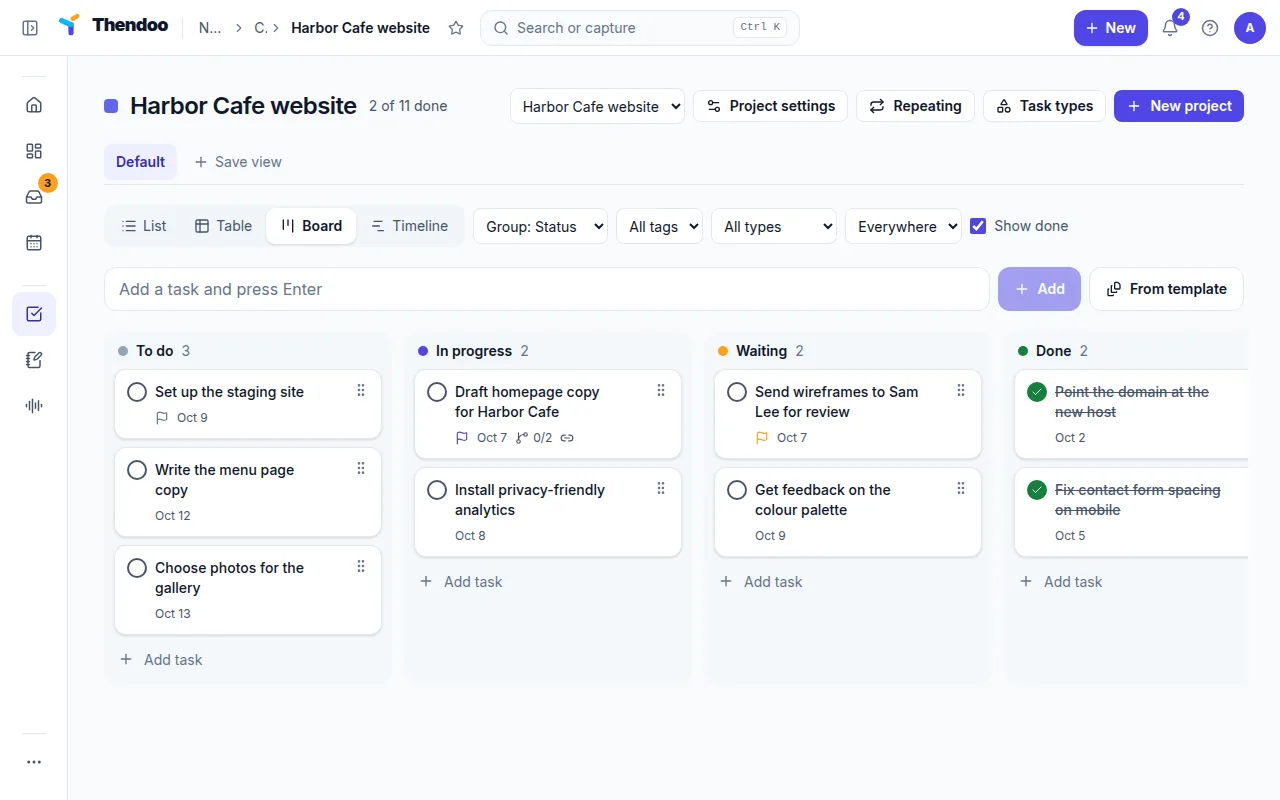
The Tasks page (/tasks) shows Everything until you filter it. Choose a layout:
- List for quick scanning.
- Table for columns you can resize and sort, including your own custom fields.
- Board for dragging cards between status columns. It also works from the keyboard.
- Timeline for a 42-day view where you drag bars to change dates.
Group by status, priority, Space, project, type or due date, and filter by Space, tag, type or source. Save view keeps a setup you use often.
Change many tasks at once
Section titled “Change many tasks at once”Tick the tasks you want, or Select all. The Selected tasks bar offers Complete, Reopen, Set date, Priority, Status, Move to project, Move to Space and Delete. It works on up to 500 tasks, and either every task changes or none do.
Tasks synced from ClickUp keep their details in ClickUp. Thendoo only decides when you work on them.