Use templates for things you do again
If you’ve ever rebuilt the same packing list from memory, a template saves you the trouble. You write the list once, with each item set a number of days before or after a key date. When you use it, you pick the date and Thendoo works out every due date.
Find your templates
Section titled “Find your templates”Open Docs in the sidebar and choose the Templates tab (or go to /templates). Docs and Templates sit side by side.
Start from a starter
Section titled “Start from a starter”Under Starters, choose Add to my templates on any of these:
- Travel packing: documents, bookings and packing, from two weeks before departure up to the day itself.
- Month-end close: a six-step checklist.
- Onboarding a new employee: from two weeks before the start date to 90 days after.
Once added, a starter is yours to edit.
Make your own
Section titled “Make your own”Choose New template, give it a Name and pick a Kind:
| Kind | What using it creates |
|---|---|
| Tasks | One task per item |
| Checklist | One task, with every item as a checklist step |
| Project | A set of tasks for a bigger piece of work |
| Routine | Dated tasks for steps you repeat (not a habits routine) |
| Note | A new Doc that starts with your text |
For each item, set Days: -3 means three days before the date you pick, 0 is the day itself, and empty means no date. You can also save an existing task with Save as template, which keeps more of its details.
Use a template
Section titled “Use a template”- Choose Use on the template.
- Pick the Date it counts from, for example the departure day or the first working day.
- Optionally choose a Space.
- Check What gets created, then choose Create.
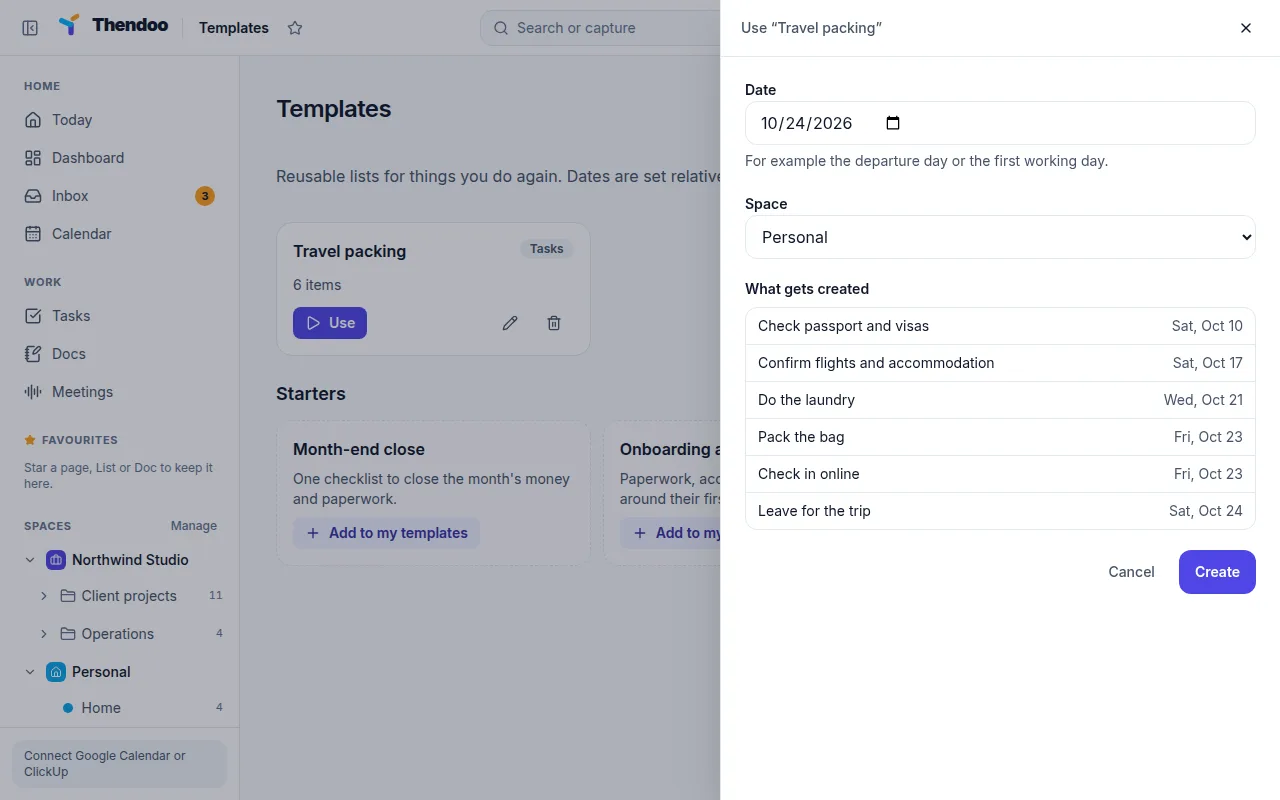
Deleting a template later doesn’t touch tasks you already made from it.
Templates from this website
Section titled “Templates from this website”The templates on this website download as JSON files in the thendoo-template/v1 format. The Thendoo app doesn’t have a button to import those files yet. For now you can copy the items into New template by hand.