Plan your day, close it, review the week
Thendoo has three planning rituals. Each one is optional and short. Together they mean you never start a day from a blank page or end one wondering what you forgot.
Morning: Plan my day (about ten minutes)
Section titled “Morning: Plan my day (about ten minutes)”Open Plan my day from Today, or go to /plan.
- Look at today. You see your free time, how many meetings you have, what was Carried over (“From earlier days. No rush: pick one up or let it wait.”) and how much is in your Inbox. Nothing here asks you to act.
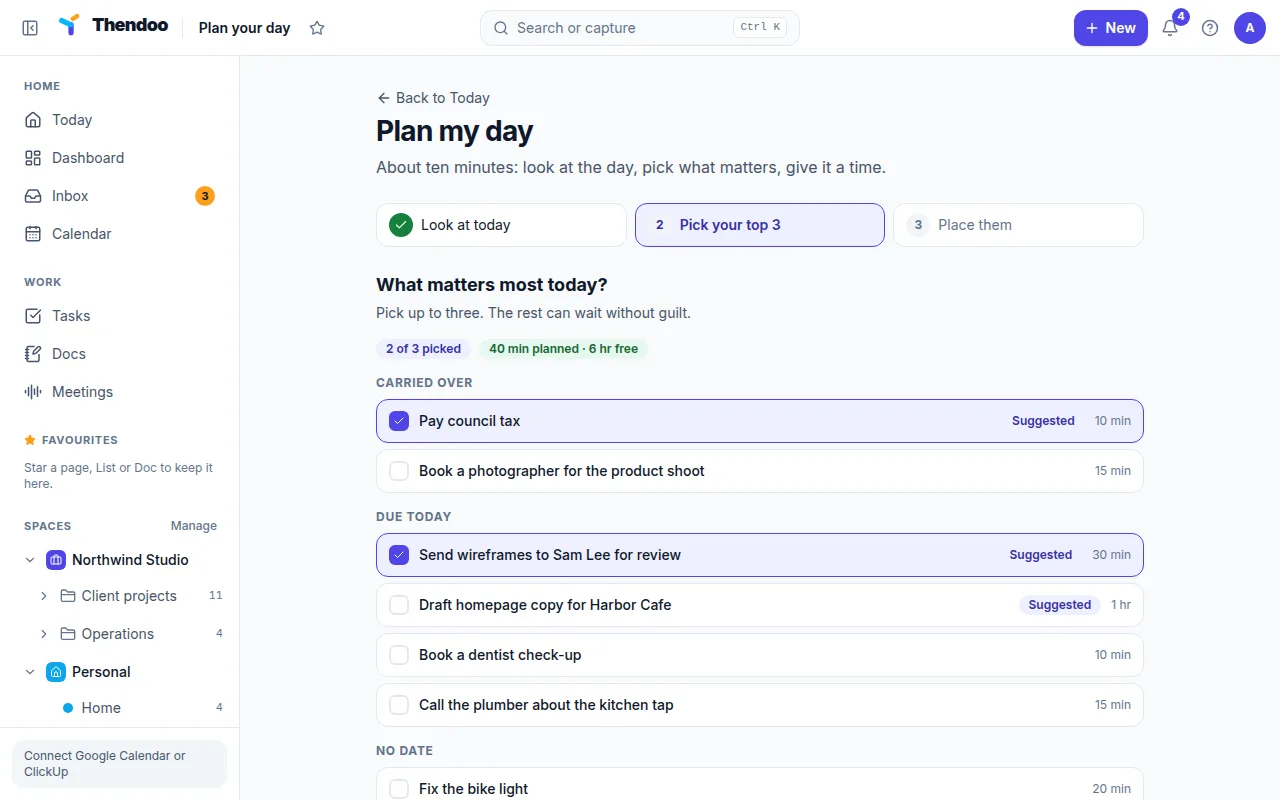
- Pick your top 3. Tasks are grouped as Carried over, Due today, No date and Coming up. A Suggested pill marks a few likely picks; it comes from simple rules (carried over and due today, by priority), not AI. If your picks add up to more than your free time, Thendoo says so gently.
- Give them a time. Each pick lands in the next free slot, using its estimate or 30 minutes. Move any start time, then choose Save my plan.
Your picks appear on Today in the Top 3 today card.
Evening: Close the day
Section titled “Evening: Close the day”Open Close the day (/shutdown).
- For each of today’s tasks choose Done, Tomorrow or Leave. Tomorrow is already selected, so most days you only tick what you finished. Move all to tomorrow does the rest in one go.
- Write One line about tomorrow, such as “Start with the report, before email”.
- Choose Close the day. You’ll see Day closed and “Nothing is lost. Rest well.”
Weekly: Weekly review
Section titled “Weekly: Weekly review”Open Weekly review (/review). It shows totals for Done, Still open and Coming up, a line about your Inbox, and a card for each Space. Look back without judging, then write two or three Big rocks for next week and choose Save review. Use Previous week to look further back.