Set a monthly budget
A budget in Thendoo is one number per category per month: “I want to spend about this much on groceries.” It’s a guide for you, not a rule the app enforces.
Create a budget
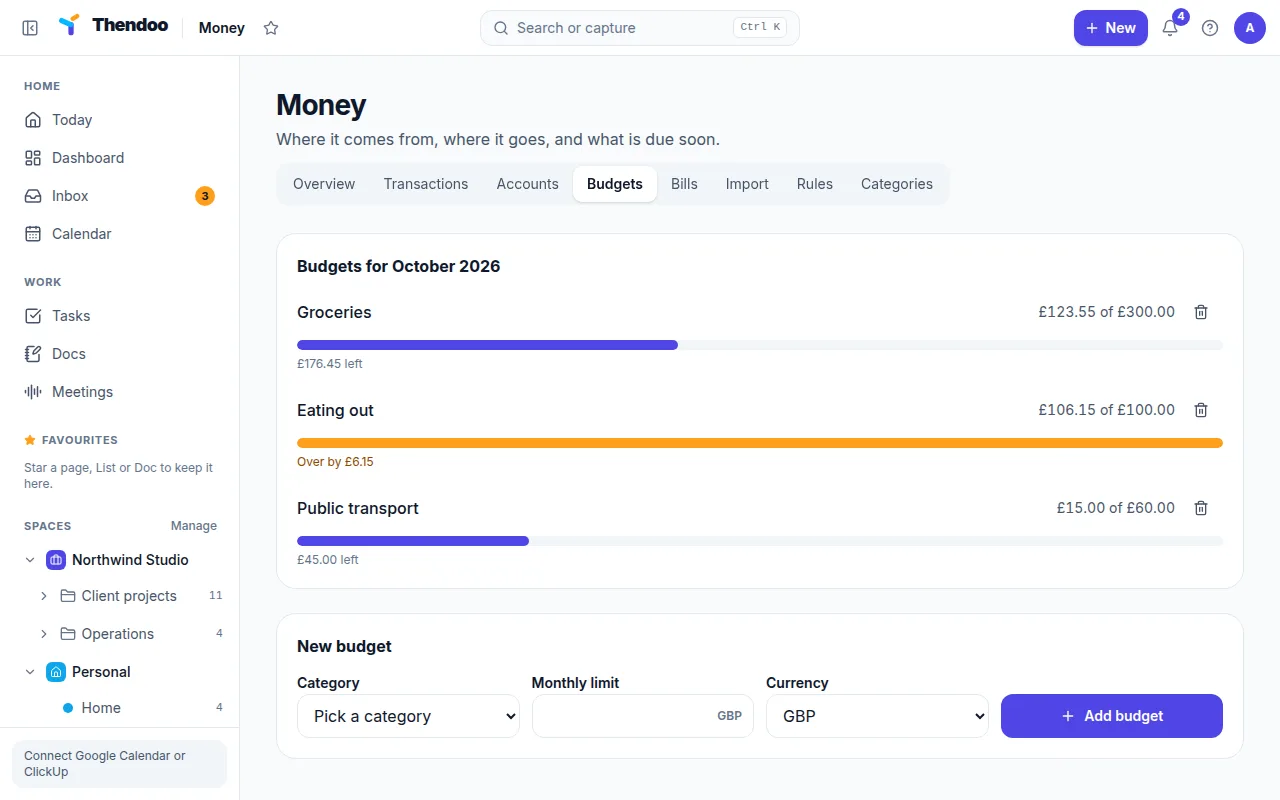
Section titled “Create a budget”- In Money, open Budgets.
- Choose a category and enter a monthly limit.
- Repeat for the few categories you actually want to watch. Three to five is plenty to start.
Categories can have one level of sub-categories, and budgets roll up. A budget on Food counts spending in Groceries and Eating out too, so you can budget broadly or narrowly.
Reading your progress
Section titled “Reading your progress”Each budget reads like $120 of $400, followed by either $280 left or, once you pass the limit, Over by $15. Going over shows in a soft orange, never red. The Budgets section of the Overview tab shows the same picture next to Money in, Spent and Left over.
Budgets only count transactions that have a category. If your numbers look low, check Transactions for uncategorized items, or use Run on uncategorized in Rules to sort them in one go.
No rollover
Section titled “No rollover”If you want to save up for something bigger, such as a yearly insurance payment, track it as a bill or set a higher limit in the month it lands.
Changing a limit
Section titled “Changing a limit”You can’t edit a budget’s limit yet. To change it, delete the budget and create it again with the new amount. Your transactions aren’t affected.
Budgets are a planning aid, not financial advice. For decisions about debt, taxes or investments, talk to an accountant or financial adviser.