Start a focus session
The focus timer opens full screen at /focus and hides everything else, so the only thing in front of you is one task and a countdown.
Start from a task or on its own
Section titled “Start from a task or on its own”The easiest way in is Start focus on a task, for example on the Top 3 today card. That links the session to the task, and the timer can start from the task’s remaining estimate. You can also open /focus directly when you just want a timer.
One block or Pomodoro
Section titled “One block or Pomodoro”| Mode | What it does | Defaults and limits |
|---|---|---|
| One block | A single countdown | 25 minutes, or the task’s remaining estimate, up to 180 minutes |
| Pomodoro | Work rounds with a break after each | Work 25 minutes (1–180), break 5 minutes (1–60), 1–12 rounds |
There is no long break after several rounds. If you want one, end the session and start a new one later.
Pick One block when you already know roughly how long the task takes. Pick Pomodoro when the task feels big and you want permission to stop every 25 minutes.
Shrink the start
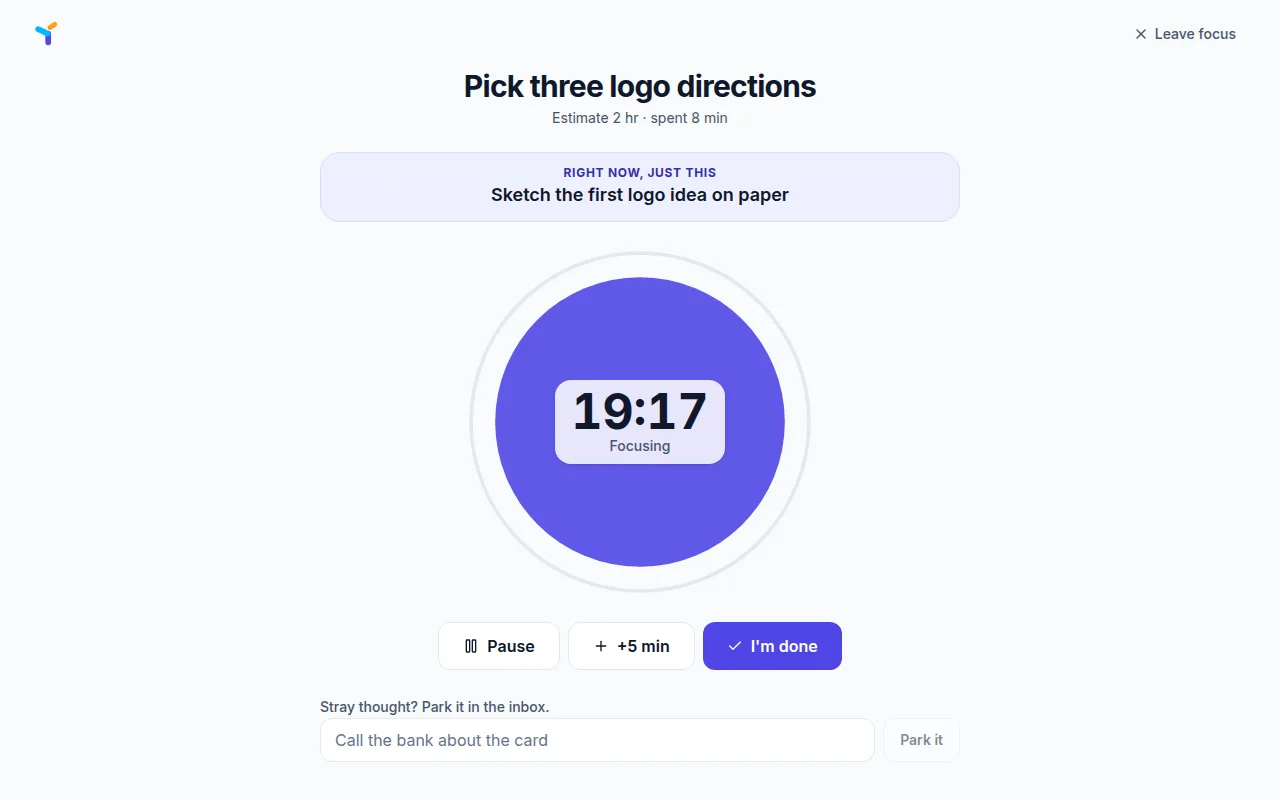
Section titled “Shrink the start”Under Right now, just this: type the first physical action, such as “open the draft and read the last paragraph”. It stays on screen while the timer runs, so you never stare at a blank task wondering where to begin.
During the session
Section titled “During the session”- Pause and Resume stop the clock without ending the session.
- +5 min adds five minutes when you’re nearly there.
- Stray thought? Park it in the inbox. Type the thought and choose Park it. It goes to your Inbox for later, and you stay in the session.
- On a Pomodoro break, the screen says Break. Stand up, stretch, drink water.
- I’m done ends the session early, with no penalty.
What gets counted
Section titled “What gets counted”Only the minutes you actually worked count. Pauses and breaks are left out. At the end you see You focused for and the time, plus the rounds you finished. When the session is linked to a task, the minutes are added to its tracked time, and the task shows Estimate … · spent ….