Create a when-then habit
“I’ll drink more water” rarely sticks. “When I sit down at my desk, then I’ll fill my glass” often does. Thendoo’s name comes from that pattern: when a moment happens, then do one small thing.
Write the habit
Section titled “Write the habit”Go to Habits (/habits) and choose New habit. The form has three lines:
- When: a moment you already have, such as “After coffee”, “When I get home” or “After I brush my teeth”. Habits with the same cue are grouped together, which makes stacking easy.
- Then I will: the habit itself, such as “Take vitamins”.
- Tiny first step (optional): make it so small it’s hard to say no to. “Open the pill box” counts. On a hard day, the tiny step is enough.
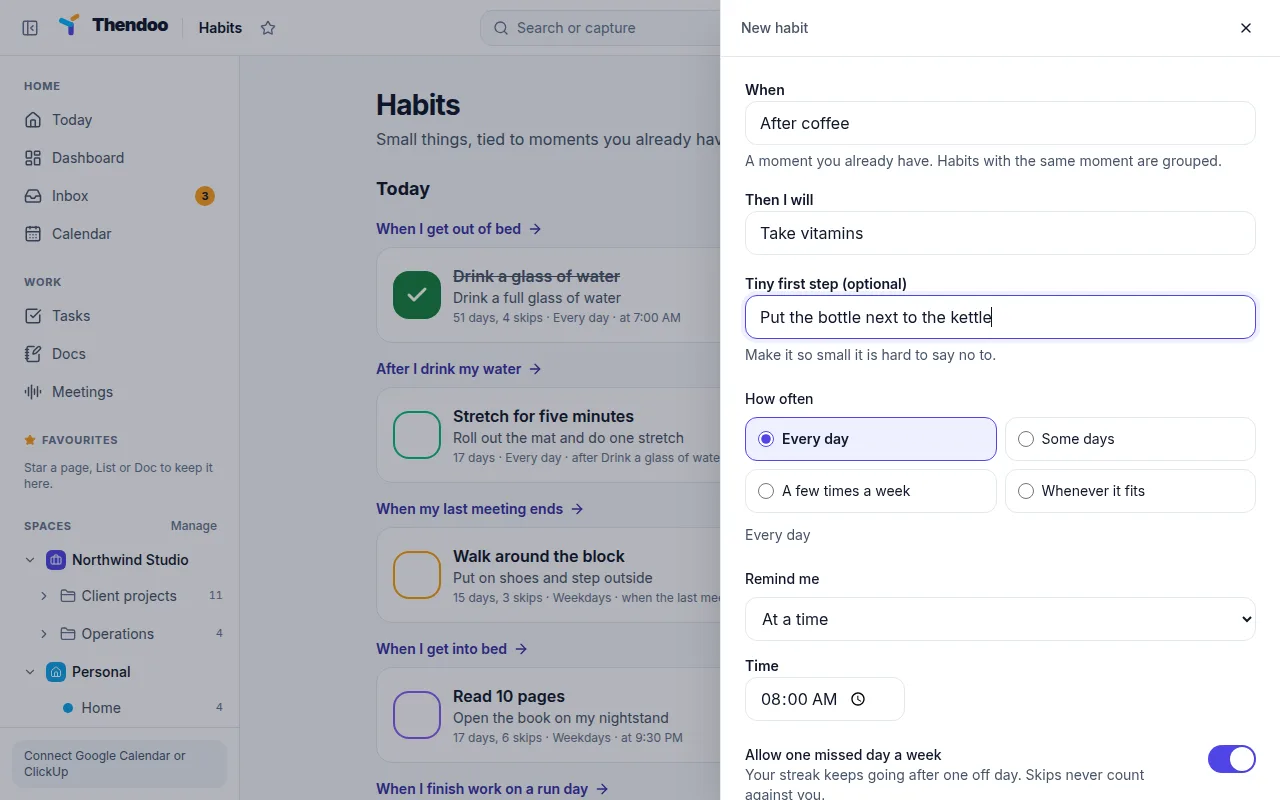
Choose how often
Section titled “Choose how often”Under How often, pick one:
- Every day
- Some days, then choose Which days
- A few times a week, then choose Times a week (1 to 7)
- Whenever it fits, for habits with no set day
Choose a reminder
Section titled “Choose a reminder”Under Remind me:
- No reminder: the cue itself is the reminder. Often the best choice.
- At a time: a fixed clock time.
- After another habit: fires when you tick the habit you pick, so habits chain.
- When a meeting ends: after your last meeting of the day, or only meetings whose title contains words you give (for example “standup”).
Save and check in
Section titled “Save and check in”Choose Add habit. It shows on the Habits page and in the Habits card on Today. Tap the check when it’s done, and tap again to undo. To stop a habit for a while without losing its history, edit it and turn off Active to pause it.
Pick a good first habit
Section titled “Pick a good first habit”Start with one. Choose something that takes under two minutes and hangs off a cue you never miss. Once it runs on its own for a few weeks, add the next.