Read your weekly insights
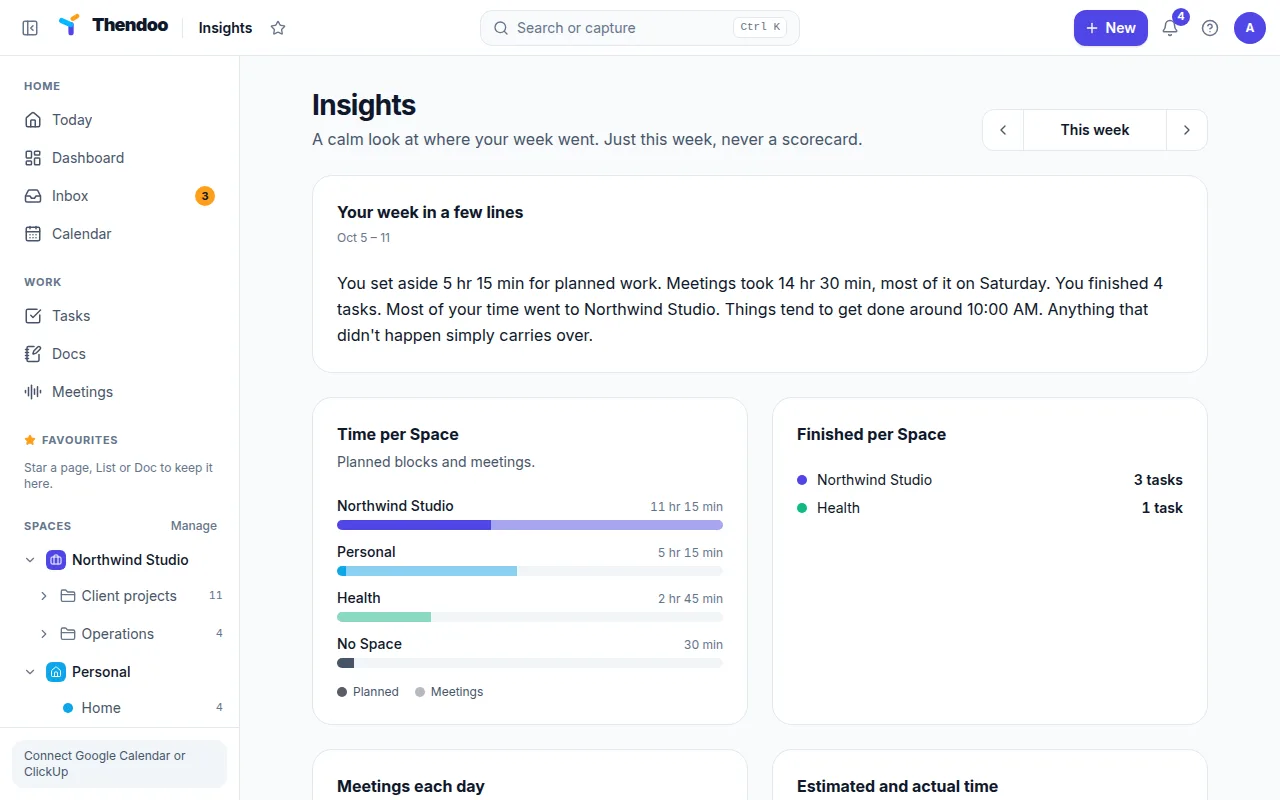
Open More at the bottom of the sidebar and choose Insights. You can also pin it to the sidebar from there. The page says it plainly: “A calm look at where your week went. Just this week, never a scorecard.” There are no grades, no goals and no comparisons between weeks. Use Previous week and Next week to move around, and This week to come back.
The six cards
Section titled “The six cards”Your week in a few lines sums things up in plain sentences, for example “You set aside 6 h for planned work” or “Most of your time went to Client A.” In a slow week it says “A quiet week so far. Nothing to report, and that’s fine.”
Time per Space adds up your time blocks (Planned) and your Meetings for each Space. Anything without a Space shows as No Space. Tasks you never blocked time for don’t count here, so the card shows your plan, not every minute you worked.
Finished per Space counts the tasks you ticked off in each Space.
Meetings each day lists how much meeting time each day held. A day with four hours of calls explains why the rest of that day didn’t move.
Estimated and actual time compares your estimates with the time recorded on tasks you finished that week, from focus sessions and the task timer. It only counts tasks that have both an estimate and recorded time.
When things get done shows the hours you usually finish tasks, from the last four weeks. If it says “Most often around 10:00”, that’s a good time to place your hardest task.
Using it in your weekly review
Section titled “Using it in your weekly review”Insights pairs well with the Weekly review. Look at Time per Space first: if one Space got most of the hours, decide whether that was the right call. Then check Estimated and actual time. If tasks keep taking twice your estimate, double the next few estimates before you plan.
What Insights doesn’t show yet
Section titled “What Insights doesn’t show yet”Insights covers time, tasks and meetings only. There are no habit or spending insights yet. For habits, open a habit’s History heat map. For money, use Overview on the Money page.