Write Docs and link them together
Docs is where longer writing lives: plans, meeting notes, how-tos, a journal. If you used Thendoo before, this is the page that used to be called Notes.
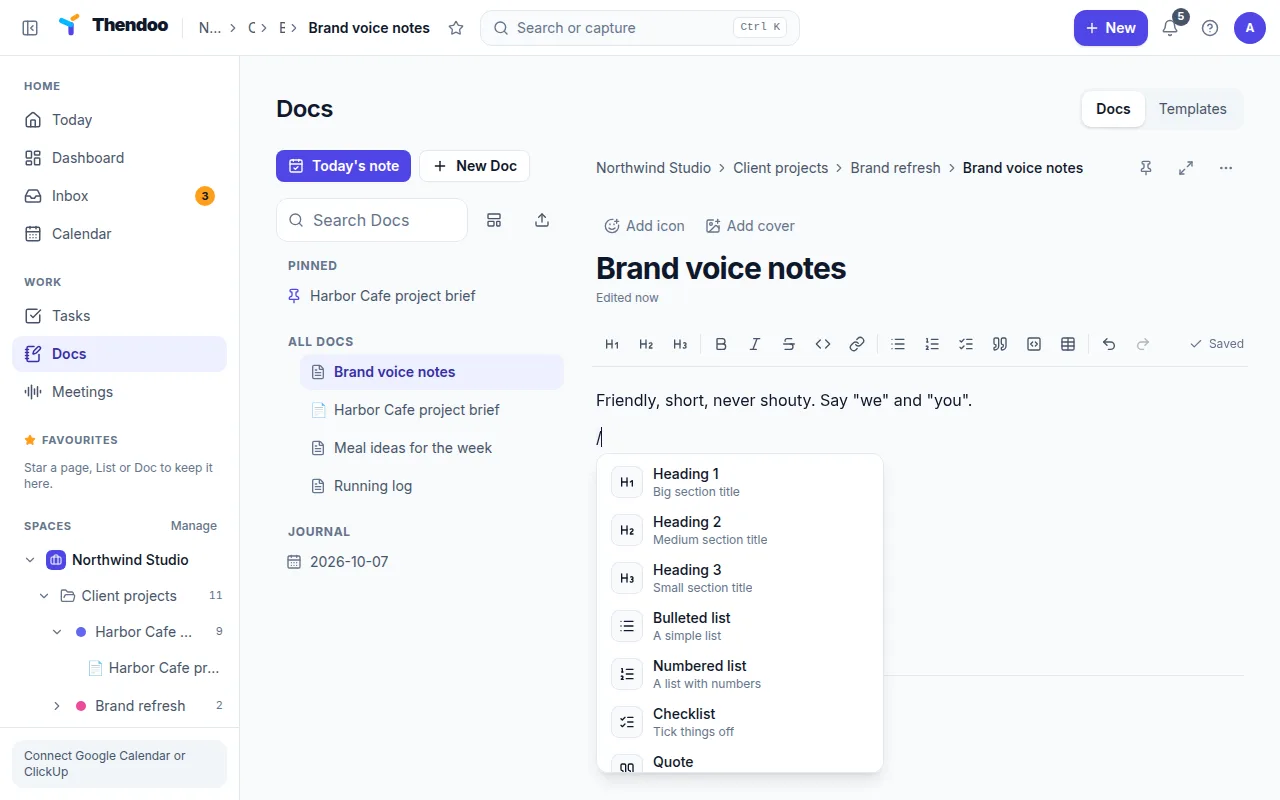
Choose New Doc and start typing. The placeholder says it all: “Type / for commands, @ to mention”. The / menu offers Heading 1 to Heading 3, Bulleted list, Numbered list, Checklist, Quote, Code block, Divider, Table, Callout (Info, Tip or Warning) and Sub-page.
One block is special: Task list from a List shows the open tasks of a List you choose, live, and you can tick them off right inside the Doc. Handy for a project brief that always shows what’s left.
Docs save as you type; the status reads Saved. Dress a Doc up with an icon, one of 8 covers or Full width, and Pin the ones you open daily.
Link with @mentions
Section titled “Link with @mentions”Type @ and pick a Doc, Task or Person. The mention becomes a link you can follow. At the bottom of each Doc, a line such as “3 Docs link here” lists the Docs that point to it, so related pages find each other.
Today’s note and the Journal
Section titled “Today’s note and the Journal”Choose Today’s note for a Doc tied to today’s date, one per day. Past days collect under Journal. Use it for a quick log, not a diary you must keep up; a blank day is fine.
Templates
Section titled “Templates”New Doc from a template offers four Starters: Meeting notes, Project brief, SOP and Weekly plan. Turn any Doc into your own with Save as template.
Import an Obsidian vault
Section titled “Import an Obsidian vault”Choose Import Obsidian vault and pick a .zip of your vault, up to 25 MB and 5,000 notes. Links between notes are kept, files named like 2026-10-06 become daily notes, and the .obsidian settings folder is skipped.