Import bank transactions from CSV or Excel files
Thendoo reads bank and card statements from CSV and Excel files, including the web-page tables many banks save with an .xls name. You download the file from your bank, upload it to the account it belongs to, and Thendoo finds the table and the columns for you.
Before you start
Section titled “Before you start”- Create the account first (see Add accounts and currencies), because every import goes Into account.
- Files can be up to 5 MB and 20,000 rows.
- Thendoo recognizes headers in English and Hebrew, some Arabic and French, and a few German and Spanish words. It also detects the delimiter and text encoding of a CSV, 11 date formats, the decimal mark, and whether charges are negative numbers or in separate debit and credit columns.
Which files work
Section titled “Which files work”- CSV, with a comma, semicolon, tab or pipe between columns, in UTF-8, Windows-1255 or Latin-1.
- Excel workbooks (
.xlsx). Thendoo picks the first visible sheet that holds a statement, so a summary sheet in front of it doesn’t get in the way. - Excel (web page): the HTML tables many banks download with an
.xlsname. They are read like any other table.
Thendoo looks at what the file contains, not at its name. The header row is found even under a few title lines, and total lines and repeated header rows are left out.
Import a statement
Section titled “Import a statement”-
In Money, open the Import tab and find Import a statement. Choose Into account, pick the file under Statement file, then press Upload. Once you have saved formats, Read it as lets you pick one, or leave it on Detect automatically.
-
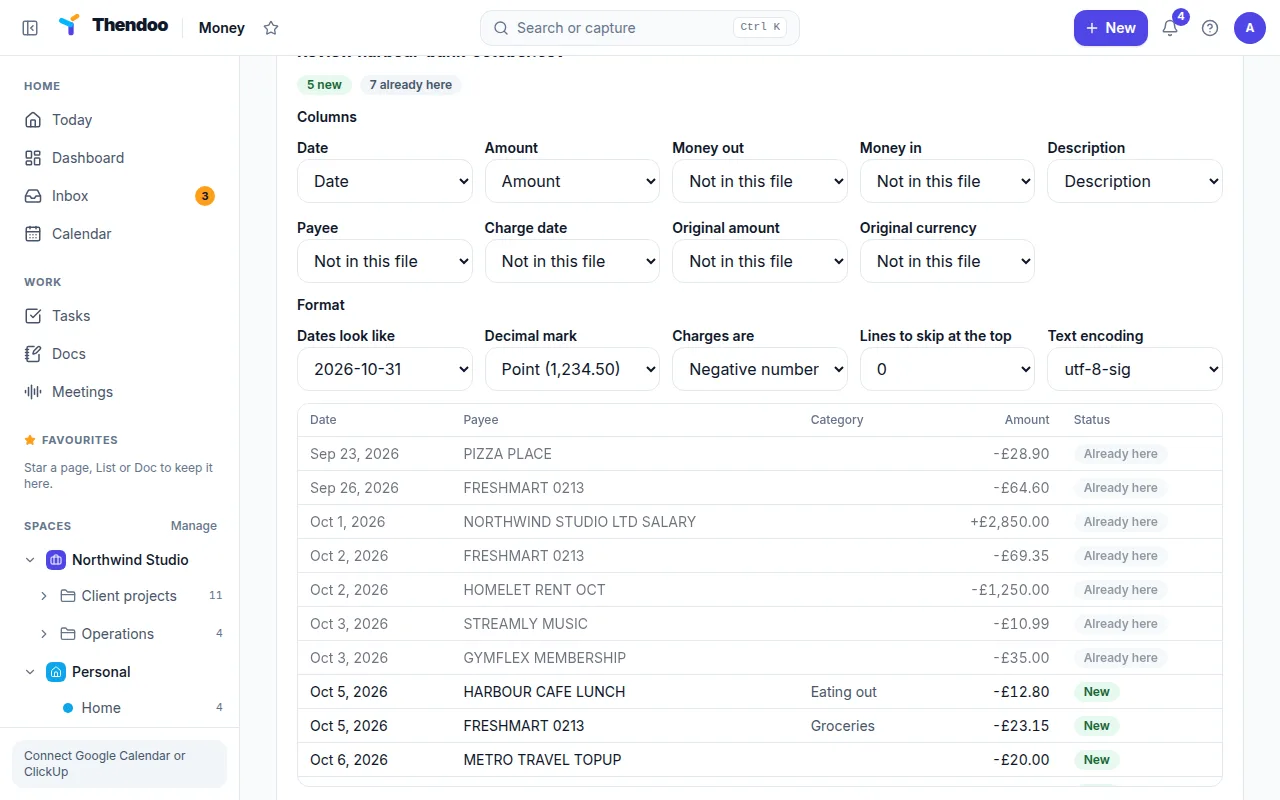
Read the counts: new, matches your entry, already here and unreadable lines.
-
If something looks off, open How the file is read. Under Columns, choose which column is Date, Amount (or Money out and Money in), Description, Payee, Charge date, Original amount and Original currency. Under Format, adjust Sheet, Dates look like, Decimal mark, Charges are, Lines above the header or Text encoding.
-
Check each line’s category in the preview (see below), and the lines marked Your entry.
-
Optionally fill in Save these settings as. Next time a file with the same columns arrives, it is read the same way. If a saved format was used and you changed something, tick Update “…” with these settings instead.
-
Press Import with the number of transactions shown on the button, such as Import 12, merge 1.
Lines that match what you added by hand
Section titled “Lines that match what you added by hand”If you added a purchase yourself (“Coffee, 18, Tuesday”) and the bank later lists it as “AROMA TLV 1234”, Thendoo offers to merge them instead of counting the money twice. A statement line matches an entry you added by hand on the same account, with the same amount, within 3 days. Each entry is matched at most once.
- Merge means the match is clear, and it is ticked for you.
- Merge? Check it means it is less certain, and it waits for your tick.
The row shows Your entry with the name and date of what you added. A merged entry keeps your payee, category, Space and notes, and takes the bank’s date and wording. Undoing the import puts your entry back the way it was.
Categories in the preview
Section titled “Categories in the preview”A new line can come with a category already filled in, and the preview says where it came from:
- From a rule: one of your money rules matched.
- Like last time: you used this category most often for the same payee before.
- From your entry: the line is merged into an entry that already has one.
Change any line with its category menu, or select several lines and use Set category. Tick Always for this payee to turn your choice into a rule for next time.
Importing the same file twice is safe
Section titled “Importing the same file twice is safe”Each transaction gets a fingerprint from the account, date, amount, cleaned-up description and its position among identical lines. Lines already imported are skipped, so overlapping statements add zero duplicates. Two genuinely identical charges on the same day are both kept.
Changed your mind? Past imports lists every import with Undo import. Saved formats lists how each bank’s file is read, where you can Rename, Copy or Delete a format.
Card payments
Section titled “Card payments”Once a month your bank pays each credit card in one line. If you import both the bank and the card, that money would be counted twice. To avoid this, set Paid from account on the card (see Add accounts and currencies). Then open the Transactions tab and look at Card payments:
- When a bank line adds up exactly to a run of the card’s unpaid charges, it is suggested, for example “₪251.40 from Leumi paid Visa Cal, Oct 10”. A less certain suggestion shows Check it. Choose Link card payment.
- No suggestion? Use Link a card payment by hand: pick the Card and the bank line. Thendoo shows how many charges it pays and any difference, such as interest, fees or charges not imported yet.
The bank line becomes a transfer to the card and shows Card payment, and the charges keep their categories and show Paid. Unlink undoes it. A card in one currency paid from an account in another isn’t suggested yet.