Capture anything fast
A thought you don’t write down is a thought you keep carrying. Capture in Thendoo is one box that opens anywhere, takes plain words, and gets out of your way.
Open the capture box
Section titled “Open the capture box”Press Ctrl K (⌘ K on a Mac) on any page, or click Search or capture in the top bar. The same box also searches your tasks, events, Spaces and more.
Type it the way you’d say it
Section titled “Type it the way you’d say it”Thendoo reads a few patterns as you type. It runs on your device, in English, with no AI.
| You type | Thendoo understands |
|---|---|
tomorrow, next Friday, in 3 days, Oct 12 |
The due date |
10am, 14:30, at 5, noon |
The time |
#Work |
The Space (close spellings match too) |
!1 to !4 |
Priority, from Urgent to Low |
~30m, ~1h30 |
How long you think it takes |
So renew passport next Friday #Personal !2 ~20m becomes a High priority task in Personal, due next Friday, with a 20-minute estimate.
Add it now or park it
Section titled “Add it now or park it”- Enter adds it as a task straight away.
- Shift Enter sends it to the Inbox untouched, for when you don’t want to decide anything yet.
A small message offers Undo if you change your mind.
Sort the Inbox later
Section titled “Sort the Inbox later”The Inbox (/inbox) holds everything you caught, waiting to be sorted. No rush. When you have five quiet minutes, choose Sort one at a time. Each card comes pre-filled from your words, and you change anything you like.
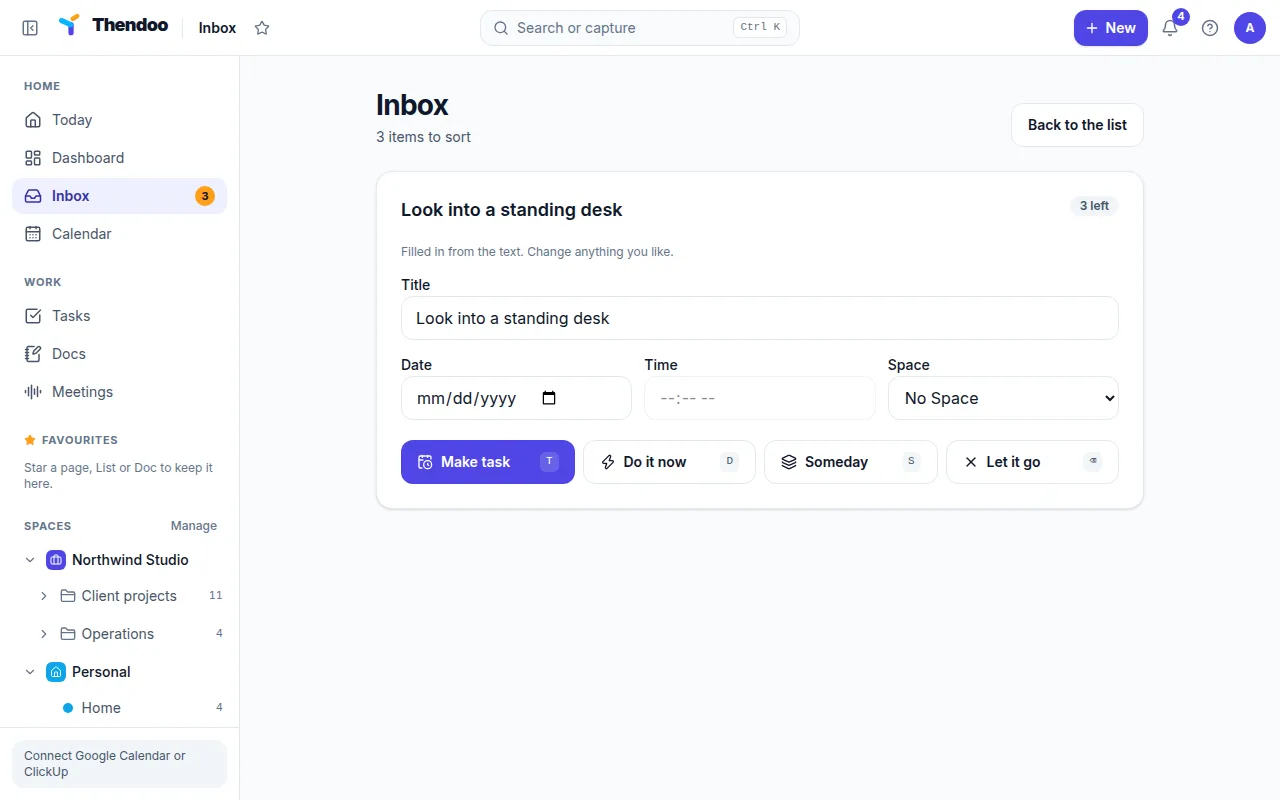
For each card, press a key or choose a button:
- Make task (T) keeps it as a task with the details shown.
- Do it now (D) is for two-minute jobs. Do it, and Thendoo records it as already done.
- Someday (S) keeps it without a date.
- Let it go (Delete) drops it.
Press Esc to stop at any point. When the last card is gone you’ll see All sorted.