Turn on ADHD mode
ADHD mode is a single switch that makes Today quieter. It’s for anyone who finds a busy screen hard to start from, and you never have to say why you turned it on. It’s off until you choose it.
Turn it on
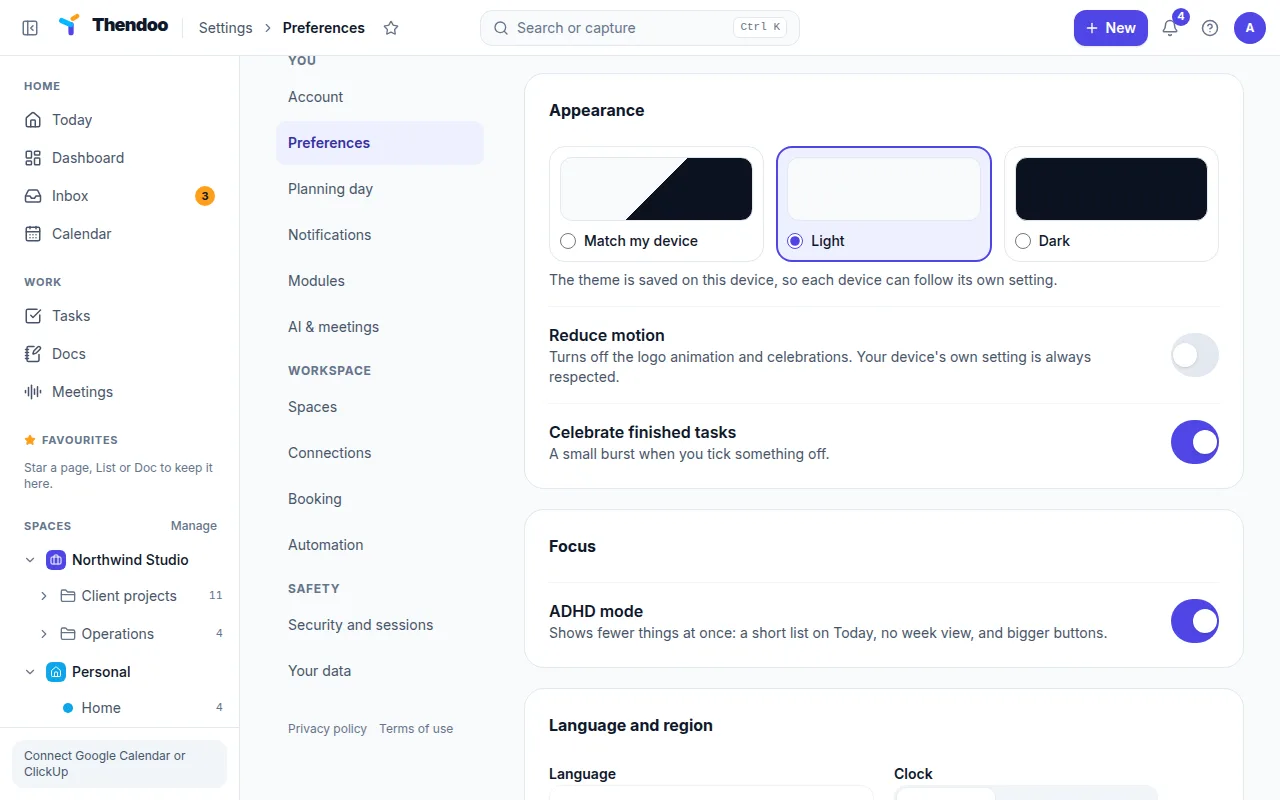
Section titled “Turn it on”- Go to Settings → Preferences.
- In the Focus section, turn on ADHD mode.
The setting belongs to your account, not your browser, so it follows you to any computer you sign in on.
What changes on Today
Section titled “What changes on Today”- One day at a time. The Day/Week toggle disappears, so you only see the day in front of you.
- A short list to schedule. The To schedule tray shows at most three tasks that are due or carried over. The rest, including tasks without a date, wait behind a button such as Show 4 more until you ask for them.
- No summary line. The count of meetings, planned and carried-over items is hidden, so there’s one less number to react to.
- Bigger buttons. Buttons grow to at least 44 pixels, which is easier to hit when you’re tired or in a hurry.
Nothing is deleted or moved. Turning ADHD mode off brings everything back as it was.
What changes elsewhere
Section titled “What changes elsewhere”- Bigger buttons on every page, not only on Today.
- Shorter dashboard lists. List widgets on the dashboard show at most three items.
- Shorter link cards. On the Links page, each category card shows fewer links before Show more.
Pair it with these
Section titled “Pair it with these”- Start focus on a task in Top 3 today opens a full-screen timer with just that task. If a stray thought pops up, Park it sends it to the Inbox without leaving the session.
- Hide modules you don’t use yet, so the sidebar is shorter too.
- Use Plan my day to pick three things, so the short list is the right list.