Track bills and subscriptions
Bills are the money that leaves on a schedule: rent, phone, streaming, insurance. Telling Thendoo about them means they show up on your day a few days ahead instead of as a surprise.
Add one by hand
Section titled “Add one by hand”In Money, open Bills and add a bill with:
- a name and an amount
- a cadence: weekly, monthly or yearly
- the next due date
- the account it’s paid from and a category
- its kind: bill or subscription
Let Thendoo find them
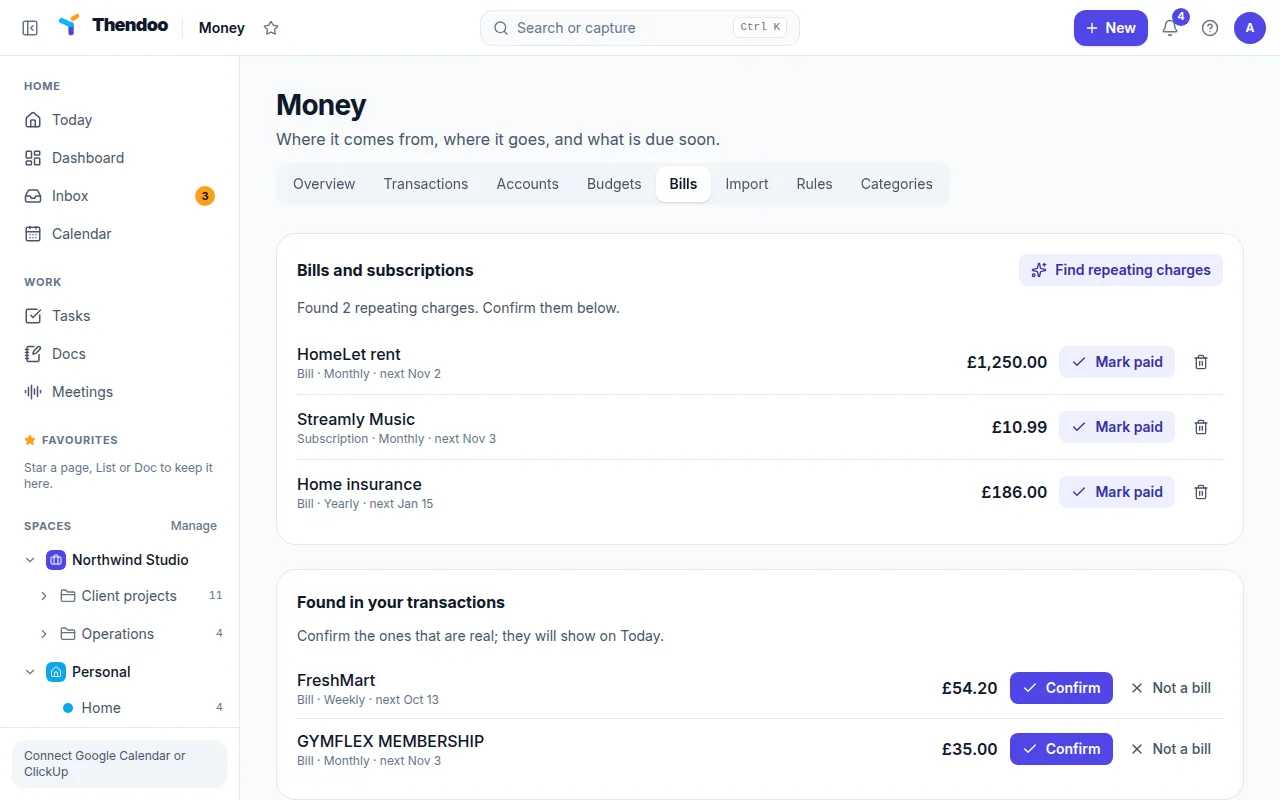
Section titled “Let Thendoo find them”If you’ve imported a few months of transactions, choose Find repeating charges. Thendoo looks back 400 days for the same payee charging similar amounts (within 20% either way). To count as a pattern it needs at least 4 weekly, 3 monthly or 2 yearly charges. Each result shows Confirm or Not a bill, so nothing is added without your say-so.
A good first pass: import your last six months, run the search, confirm what’s real, then add yearly bills by hand if you don’t have two years of history.
Where bills show up
Section titled “Where bills show up”| Place | What you see |
|---|---|
| Today | A Bills card with anything due within the next 7 days |
| Money → Overview | Coming up, covering the next 14 days |
| Calendar | The Bills layer, which you can show or hide |
| Reminders | A reminder the day before, or a week before for yearly bills |
Reminders appear in the in-app bell and as browser pop-ups while a Thendoo tab is open. There are no email or phone notifications yet.
Paying a bill
Section titled “Paying a bill”Choose Paid, and the next due date moves forward one cycle. If you import a statement that contains a matching charge, the date moves forward on its own.
For renewals that aren’t payments, like a passport or a domain, use Life admin instead. It reminds you weeks ahead.