Add accounts and currencies
Accounts are the containers your money lives in. Every transaction belongs to one, and an account’s balance is simply its Opening balance plus all of its transactions.
Add an account
Section titled “Add an account”Go to Money, open the Accounts tab and add a new account. Fill in:
- Name: what you call it, such as “Everyday checking”.
- Type: Bank account, Credit card, Cash, Digital wallet, Loan or Investment.
- Currency: one currency per account. If a bank gives you a USD and a EUR pocket, add them as two accounts.
- Bank or provider: optional, just for your own reference.
- Opening balance: the amount in the account on the day you start tracking it.
Credit cards also have Paid from account: the bank account that pays the card each month. Once it is set, Card payments on the Transactions tab suggests the bank line that pays the card’s charges, so your spending is counted once (see Import bank transactions from CSV or Excel files).
When you stop using an account, archive it instead of deleting it so its history stays intact.
How amounts are stored
Section titled “How amounts are stored”Thendoo stores money as whole units of the smallest coin, never as rounded decimals, and follows each currency’s own decimal places: none for Japanese yen, three for Kuwaiti dinar. If you type more decimals than a currency allows, Thendoo asks you to fix it rather than quietly rounding.
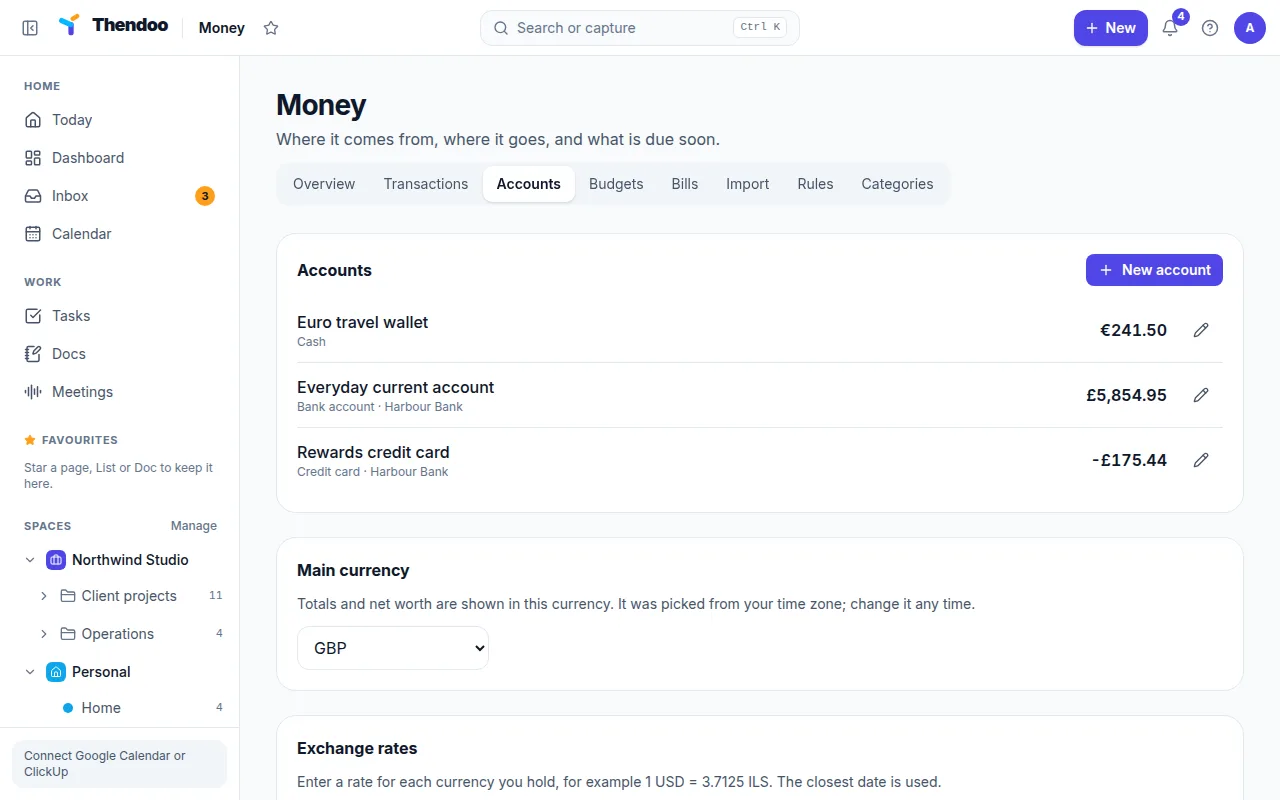
Main currency and exchange rates
Section titled “Main currency and exchange rates”Your Main currency is the one totals and Net worth are shown in. Thendoo guesses it from your time zone; change it if the guess is wrong.
Exchange rates are manual only. For each currency you hold besides your main one, enter a rate, for example 1 USD = 3.7125 ILS, with the date it applies to. When Thendoo converts an amount it uses the rate with the closest date. Rates don’t update on their own, so refresh them as often as the precision matters to you, perhaps once a month.
If a currency has no rate, its amounts are left out of totals, and Thendoo tells you so instead of showing a misleading number.